The Best Rock Identification App in 2026: A Buyer's Guide
Searching for the best rock identification app in 2026? Here's the framework that actually answers the question: judge any app on identification accuracy and honesty, human expert backup, database depth, locality maps, offline capability, collection tools, and price transparency. We build Rockhound, so we won't pretend to be neutral reviewers of competitors — instead, this guide gives you the evaluation criteria to judge any rock ID app, shows exactly how Rockhound measures against each one, and is candid about where it falls short.
First, a note on honesty
Most "best rock ID app" roundups are written by people who spent ten minutes with each app — or by the app makers themselves, quietly ranking their own product first with invented star ratings for everyone else. We're the makers of one of these apps, so here's our deal with you: no fabricated competitor reviews, no fake comparison scores. Just the criteria that matter, verifiable facts about our own app, and an honest limitations section most marketing pages would leave out. Judge for yourself.
The seven criteria that matter
1. Accuracy — and honesty about uncertainty
Photo identification of rocks is genuinely hard. Many minerals are visual near-twins (calcite vs. quartz, pyrite vs. chalcopyrite), and a photo can't capture hardness, density, or streak. So the first thing to look for isn't a claim of perfect accuracy — it's how the app behaves when it isn't sure. An app that always returns one confident answer is hiding its uncertainty from you. Look for confidence scores or ranked candidates, and guidance on taking better photos (lighting, clean specimen, multiple angles).
2. Human expert verification
The strongest accuracy feature isn't in the AI at all. A handful of apps let a real human expert review your identification. If you collect seriously — or you're about to pay for lapidary work on a stone — a professional geologist's confirmation is worth more than any algorithm's percentage. This feature is rare; if it matters to you, it may decide your choice by itself.
3. Database depth
Identification is the front door; the reference behind it determines whether you learn anything. A serious app should include Mohs hardness, crystal system, chemical formula, and formation environment for each mineral — the same properties a good field guide teaches. Thin databases produce apps that can name a rock but can't tell you anything useful about it.
4. Locality maps
"What is it?" is half the hobby; "where do I find more?" is the other half. Most identifier apps ignore location entirely. If you go rockhounding — or want to start — look for mapped collecting localities, and critically, land-status information (BLM, Forest Service) so you know whether collecting is even allowed. Our rockhounding near me guide explains why land ownership is the whole game.
5. Offline capability
Rock identification happens outdoors, and good collecting sites are usually beyond cell coverage. An app whose maps or reference data need a live connection is a parking-lot app. Check for downloadable offline maps before you commit.
6. Collection tools
A specimen without its locality and date is just a rock. The app should log each find with photos, notes, and GPS location, organize custom collections, and back everything up so a lost phone doesn't mean a lost collection.
7. Price transparency
The category's worst habit: "free" apps that hard-paywall after three scans, or bury a weekly subscription behind a confusing trial. Before downloading anything, check the App Store's in-app purchase list — it's public — and favor apps whose free tier is genuinely usable and whose pricing is stated plainly.
How Rockhound measures against each criterion
Every claim in this table comes from the app's public App Store listing — nothing aspirational.
| Criterion | How Rockhound meets it |
|---|---|
| Accuracy & honesty | AI recognizes thousands of rocks, minerals, crystals, and gemstones in seconds — and every identification carries a confidence score, so you know how much to trust it. |
| Human verification | Request a review from a professional geologist directly from the results screen; expert confirmation or correction arrives within 24–48 hours with detailed notes. (Pro / credit packs.) |
| Database depth | Thousands of minerals with Mohs hardness, crystal systems and morphology, chemical formulas, optical and mechanical properties, formation environments, and IMA status. |
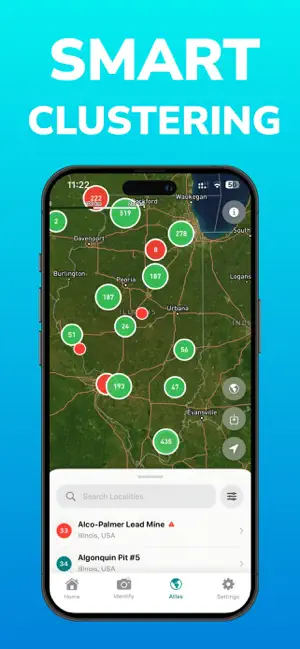
| Locality maps | Atlas of 200,000+ collecting sites with BLM and Forest Service lands, site details and directions, smart clustering, and curated Hidden Gems locations with photos, videos, and tips. |
| Offline capability | Downloadable offline maps (outdoors and satellite tiles) for remote areas without coverage. |
| Collection tools | Save specimens with notes, locations, and multiple photos; organize custom collections; cloud backup. My Locations saves favorite spots in custom lists. |
| Price transparency | Free to download and use. Pro: $39.99/year or $7.99/week. Expert review credits: 10/$24.99, 20/$29.99, 50/$49.99. All listed publicly on the App Store. |

Rockhound: Rock Identifier — AI photo ID with confidence scores, geologist verification, a 200,000-site atlas, and offline maps in one app. Free on iOS.
Download FreeThe three categories of rock apps — and why the combination is rare
Rather than pseudo-reviewing named competitors, it's more useful to understand the categories, because almost every app in this space fits one of three molds:
- Pure-AI identifiers. Camera in, name out. Fast and fun, but typically thin on reference data, silent about where to collect, and at their worst when they hide uncertainty behind a single confident answer.
- Database references. Digital encyclopedias of mineral properties — deep and authoritative, but they identify nothing for you; you still key out specimens by hand, like a paper mineral identification guide.
- Map and locality apps. Built for "where do I dig?" — collecting sites and land boundaries — but with no identification and little mineral reference.
Each category answers one question. A day of rockhounding asks all three: where do I go, what did I find, and what does that mean? Rockhound's honest structural advantage is that it combines all three categories in one app — AI identification, a full mineral database, and a 200,000-site locality atlas — and then adds a fourth layer, human geologist verification, that is genuinely rare anywhere in the category. Whether that combination beats a specialist app you already love is your call; that it's uncommon is simply a fact of the market.
Honest limitations
No app should be chosen on marketing alone, including ours. Here is where Rockhound has real limits:
- The AI can be uncertain — by design, it tells you so. Visually ambiguous specimens (weathered surfaces, look-alike minerals) can produce lower-confidence results. That's precisely what the confidence score and the geologist review exist for; treat a low score as an invitation to take better photos or run a hardness test, not as a final answer.
- A photo can't test physics. No camera-based app measures hardness, density, or streak. Rockhound bridges this with its interactive Mohs tool and detailed database entries, but decisive identification of tricky specimens still benefits from hands-on tests — or the human expert.
- iOS only. Rockhound requires iOS 17.6 or later on iPhone, iPad, or iPod touch. There is no Android version. If you're on Android, we simply can't help you yet.
- English only. The app currently ships in English.
- Expert review costs money. Geologist verification is a paid Pro feature with credit packs — professional geologists' time isn't free, and we'd rather charge plainly for it than fake it.
- Verify collecting rules yourself. The atlas shows localities and land overlays, but land status and claims change; the app informs your trip planning, it doesn't replace it.
Pricing, plainly
| Tier | Price | What you get |
|---|---|---|
| Free | $0 | Download and core use: AI photo identification, mineral database, Mohs hardness tool, collection features. |
| Rockhound Pro (yearly) | $39.99/yr | Full Pro feature set, including expert geologist verification. The sensible option for regular collectors. |
| Rockhound Pro (weekly) | $7.99/wk | Same Pro features, short commitment — fine for a single trip, poor value long-term (a year of weeks costs far more than the annual plan). |
| Expert review credits | 10 for $24.99 · 20 for $29.99 · 50 for $49.99 | Packs of professional geologist reviews; per-review price drops with larger packs. |
Our honest advice: start free, identify some rocks, and only pay if the Pro features earn it. If you subscribe, the yearly plan is clearly better value than weekly.
Verdict
The best rock identification app in 2026 is the one that's honest about uncertainty, deep enough to teach you something, useful past the edge of cell coverage, and clear about what it costs. By those criteria, Rockhound makes a strong case for iPhone users: it's the rare app that combines AI identification with confidence scores, a serious mineral database, a 200,000-site collecting atlas with offline maps, and — almost uniquely — real geologists reviewing your finds. It's free to try, and its limits (iOS only, English only, paid expert review) are stated right here rather than discovered later. Download it, point it at the weirdest rock on your shelf, and judge it against this guide's criteria yourself — then take it somewhere with a bucket and a pair of gloves.
Frequently asked questions
What is the best rock identification app?
The best rock identification app is the one that combines accurate photo ID with honest uncertainty handling, a deep mineral database, locality maps, and offline capability. Rockhound is the app we build, and it is genuinely rare in combining all four categories plus optional verification by professional geologists — but judge any app, including ours, against the criteria in this guide.
How accurate are rock identification apps?
No photo-based identifier is 100% accurate — many minerals look alike, and photos cannot capture hardness or density. Good apps handle this honestly by showing a confidence score with each result. Rockhound also lets you request review by a professional geologist, who confirms or corrects the AI identification within 24–48 hours.
Are there free rock identification apps?
Yes. Rockhound is free to download and use, including AI photo identification, the mineral database, the Mohs hardness tool, and collection features. Optional Pro subscriptions ($39.99 per year or $7.99 per week) and expert review credit packs add geologist verification and premium features.
Does Rockhound work on Android?
No. Rockhound is currently iOS only, requiring iOS 17.6 or later on iPhone, iPad, or iPod touch, and is available in English. Android users will need a different solution for now.
Can a rock identification app tell me where to find rocks?
Most pure identifier apps cannot — locality mapping is a separate app category. Rockhound includes both: photo identification plus an atlas of more than 200,000 collecting sites with BLM and Forest Service land overlays, offline maps, and curated Hidden Gems locations with collecting tips.
What does Rockhound Pro cost?
Rockhound Pro costs $39.99 per year or $7.99 per week. Expert geologist review credits are sold separately in packs: 10 credits for $24.99, 20 for $29.99, or 50 for $49.99. The core app — photo ID, database, Mohs tool, and collection — is free.